
DICE Access
DICE FMEvents
1.04.00 Reviews
- Version
- 8.7
- Installs
- 10.00K
- Age Rating
- Everyone
Screenshots
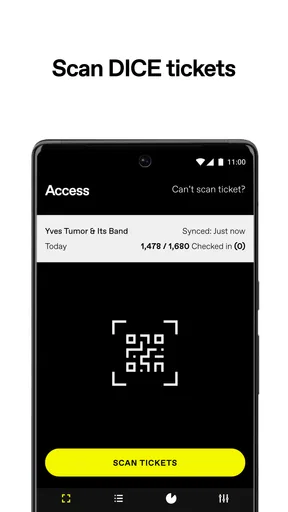
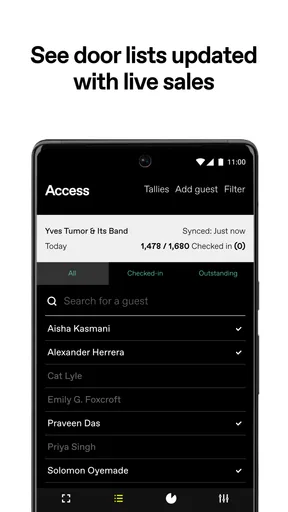
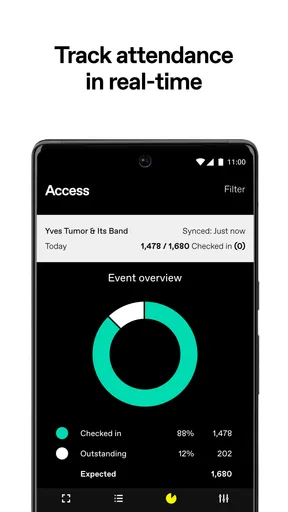
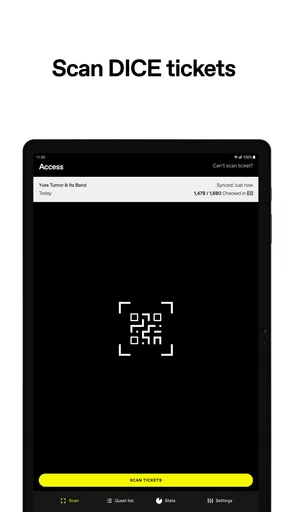
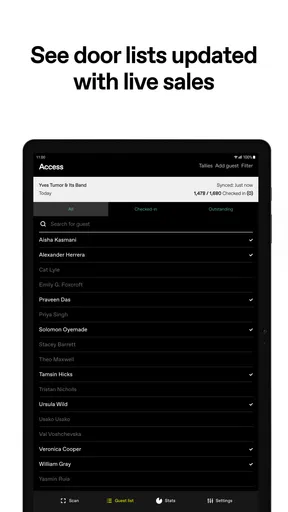
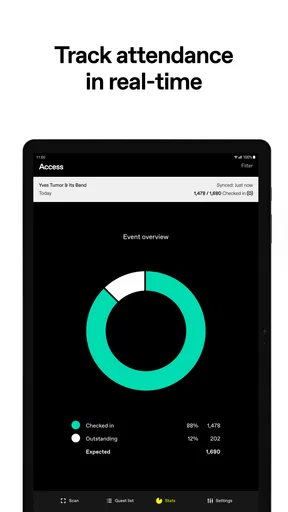
Our Review of DICE Access
 Analysis by Appyee
When I look at DICE Access, I see a very focused tool rather than a general event app. Its job is to help venues scan DICE tickets, and that narrow purpose shapes almost everything about the experience. I would not install it to browse concerts, discover artists, or manage my personal ticket collection. I would use it when I am working at the door of a venue and need a practical way to check admission.
The app is developed by DICE FM and is listed as a free Events app for Everyone. It has passed the early stage of a small experiment, with over ten thousand installs, although its average rating is only 1.0 from around seventy ratings and four written reviews. That contrast is important: the app clearly serves a real operational need, but the public feedback suggests that reliability and support experience deserve attention before a venue depends on it for a busy entrance.
Scanning tickets is the whole point
The strongest thing about DICE Access is also its limitation: it concentrates on ticket validation instead of trying to become a full event-management suite. For a venue already using DICE for ticket sales, that can be a sensible division of responsibilities. Guests buy or receive their tickets through the normal DICE experience, while staff use this separate app at the entrance.
That separation makes the role easy to understand. A door worker does not need a crowded interface filled with event discovery, recommendations, or account features. The useful question is simple: can this ticket be checked at the door? A dedicated scanning app can keep attention on that task, which matters when a queue is building and staff need to make decisions quickly.
In my view, the value here is less about the scan itself and more about reducing uncertainty at entry. A ticket that looks convincing on a guest’s phone is not automatically a ticket the venue should accept. A venue needs its staff to use the same checking process, rather than relying on visual inspection or informal judgment. That gives the entrance team a clearer workflow and makes the app relevant to security, guest flow, and front-of-house coordination.
It is worth keeping expectations realistic. This is not a replacement for the customer-facing DICE app, nor is it a universal QR-code reader for unrelated ticket providers. If your event uses another ticketing service, installing this app will not turn it into a compatible scanner. The benefit belongs mainly to venues and teams operating within the DICE ticket ecosystem.
What the focused design changes for staff
A dedicated venue tool can be easier to hand to temporary staff than a broader app. Someone working a single evening does not need to learn the whole ticketing platform. They need to recognize the scanning screen, point the phone at the attendee’s ticket, and understand the result well enough to either admit the guest or ask for assistance.
That simplicity can also expose a weakness: a focused scanner has little room to hide operational problems. If a device is poorly prepared, the venue team may feel the friction immediately at the door. I would treat the app as one part of a planned entrance setup, not as a magic solution that removes the need for staff training or a backup procedure.
A useful preparation habit is to assign one person to handle ambiguous scans instead of making every scanner operator improvise. The main line can continue moving while a supervisor checks a ticket that needs closer attention. This is a practical advantage of thinking about the app as a workflow tool rather than merely a camera pointed at a code.
How I would use it at a real entrance
Imagine a small venue opening for an evening event. One staff member welcomes guests and directs them toward the entrance, while another holds a phone running DICE Access. Guests present their DICE tickets, and the worker scans them one by one. When a scan is not immediately accepted, the worker avoids arguing in the queue and directs the guest to a separate help point.
That arrangement is more important than it might sound. The app can support the decision at the door, but it cannot replace calm communication. Guests may have a dim screen, a damaged phone, a ticket open at the wrong brightness, or a question about their booking. The scanner operator should not become both technical support and crowd controller at the same time.
I would also recommend testing the complete process before doors open. That means checking the phone, opening the app, confirming that the staff member knows where the scanner is, and rehearsing what happens when a ticket needs attention. This is one of the less obvious lessons with a venue scanner: the fastest scan is not useful if the team has no agreed response to the second scan, a confusing result, or a guest who cannot display the ticket clearly.
The app runs on Android devices using version 5.0 or later, which gives it a broad technical starting point for venues with older compatible phones. Still, compatibility is not the same as suitability. A device that technically runs the app may be uncomfortable to use for a long shift, have a weak camera, or be difficult to keep charged. I would choose the actual scanning phone with the same care I would give any piece of front-door equipment.
The current version is 8.7, so this is not presented as an abandoned first release. It originally appeared on August 8, 2019, and has continued as a distinct access tool. That history makes it reasonable to view the app as an established part of the DICE venue workflow, while the low public rating still argues for a careful trial before a high-volume event.
The scenario where it makes the most sense
The best fit is a venue that already sells admission through DICE and wants staff to validate those tickets at the entrance. In that situation, the app’s narrow purpose is an advantage. The team is not asking it to sell tickets, promote an event, or replace the venue’s wider operating systems. It simply needs to support the moment when a guest arrives.
It may be especially useful for a compact team where the person scanning tickets is also part of the general front-of-house operation. A separate access app gives that worker a clear job during the busiest part of the evening. The venue can organize the queue around the scanner instead of asking staff to search through emails, compare names manually, or use a consumer QR reader that does not understand the ticketing service.
Another practical use is consistency across multiple entry points. If a venue has more than one door, using the same access tool can make training easier than mixing different methods. I would still want a supervisor to coordinate those entrances, because consistency depends on people following the same process, not simply on every phone having the same app installed.
For a very small gathering with a short guest list, the app may be more than you need. A host who personally knows every attendee might find a manual list faster. The value increases when the guest list is larger, arrivals are concentrated into a short period, or the venue wants a repeatable check rather than personal recognition.
Where the trade-offs become visible
The clearest trade-off is specialization. DICE Access is useful because it is not overloaded with unrelated functions, but that means it has little value outside DICE-based venue entry. A venue comparing ticketing platforms should not choose this app in isolation; it should first decide whether the wider DICE system fits its events, staff, and guest habits.
The public rating also changes how I would recommend adoption. An average of 1.0 is a serious warning sign, even though ratings alone do not explain whether complaints came from device issues, account setup, event configuration, or a particular release. I would not ignore that signal. Before relying on the app for a sold-out night, I would run a controlled test with the actual venue phones and a small set of legitimate event tickets.
There is a difference between a tool being free to download and an operation being free of cost. Staff time, device preparation, charging, training, queue design, and backup planning still matter. A venue may avoid a separate scanner fee while spending more effort on making the entrance dependable. That is not necessarily a bad exchange, but it should be recognized when comparing this approach with a ticketing provider that bundles more of its door-management service.
Another trade-off is staff dependence on a phone. A dedicated device can be convenient, but a venue must think about what happens if the phone is unavailable or unsuitable at the crucial moment. I would keep a clear escalation process and avoid making one inexperienced worker the only person who knows how entry validation works. The app can be central to the process without being the entire process.
Compared with a generic QR scanner, this app should be judged on ticket-system compatibility rather than on how many types of codes it can read. A general scanner may look more flexible, but it may not provide the event-specific validation a venue needs. Compared with a full event-management platform, DICE Access is lighter and more focused, but it will not be the right choice for a team seeking one dashboard for every event task.
Small workflow choices that make a difference
My first recommendation is to separate scanning from problem solving. Keep the main entrance moving, and send unclear cases to a second person. This prevents one difficult ticket from turning into a conversation that blocks everyone behind it. It also gives the scanner operator a repeatable response instead of forcing a decision under pressure.
Second, prepare the physical setup around the app. The phone should be easy to hold, the display should be visible to the worker, and the charging plan should cover the whole shift. These details are not glamorous, but a scanning app is only as useful as the device and person operating it. A venue that tests only the software and not the complete handoff is testing the wrong thing.
Third, train staff to recognize the boundary of their role. The scanner confirms the ticket workflow; it does not give every worker authority to resolve booking disputes, make exceptions, or answer questions about unrelated event policies. A short escalation rule can protect both the queue and the guest experience.
Finally, test with the kind of conditions the door will actually face. Do not rely only on a quiet office demonstration. Try a line of people presenting phones at different angles and speeds, and make sure staff know what to do when a guest needs help. The non-obvious benefit of this rehearsal is that it reveals social friction, not just technical friction.
Who should choose it, and who should look elsewhere
I would recommend DICE Access to a venue, promoter, or event worker whose tickets are handled through DICE and who needs a straightforward entry-scanning role. It is also a reasonable candidate for teams that want to separate customer ticket use from staff access duties. The free price and broad Android compatibility make it easy to trial without committing to a paid download.
I would be more cautious if your organization has a large, complex entrance operation or expects extensive reporting, staff permissions, or event administration inside the scanner itself. In that case, a more comprehensive venue platform may be a better match, provided it supports the ticket source you use. I would also skip this app if your tickets come from another provider, because its central purpose would not apply.
For an individual attendee, there is little reason to install it simply to enter a concert. The app is aimed at the venue side of the transaction. Guests should use the ticket experience supplied for their booking, while staff use the access tool to validate admission.
My final view is cautiously positive, but only for the right audience. DICE Access understands one important moment: the instant a venue turns a digital ticket into entry. That focus can make a busy door more organized than manual checking or an unrelated QR reader. At the same time, the low average rating means I would verify the workflow on the venue’s own devices before trusting it with a major event.
If your team already works with DICE, this free Events app is worth a controlled test because its purpose is clear and its Android requirement is not demanding. I would judge it by a complete entrance rehearsal, not by the download alone. The best reason to use it is dependable, consistent ticket validation at a DICE-powered door—not a broader set of features it was never designed to provide.
Verdict
Strengths of DICE Access
- Fast access to tickets, event details, and venue information in one place.
- Useful notifications can help you keep track of upcoming events and ticket updates.
- Digital ticket storage reduces the need to carry printed confirmations.
- Clean interface makes browsing supported events relatively straightforward.
- Can simplify entry when venues support in-app ticket scanning.
Limitations of DICE Access
- Availability and features depend heavily on participating venues and events.
- Some tickets may still require external apps, emails, or venue-specific instructions.
- Account or identity verification can add extra steps before accessing tickets.
- Notifications may become excessive if many events or promotions are enabled.
- A poor internet connection may make loading tickets or event details difficult.
Other Releases by DICE FM
View All
DICE: Live Shows
Music & Audio4.7
Similar Picks in This Category
View All
Easy Quran Mp3 Audio Offline
Muslim Worldapp4.7

Invitation Maker: Cards & RSVP
Greetings Island4.9

StubHub - Live Event Tickets
StubHub4.3

Fever: Events & Tickets
Fever Labs4.7

Epic Freebie Games Radar
Arioch Pds - Apps & Games4.4

Invitation card Maker, Design
Splendid App Maker4.9
Frequently Asked Questions
What is DICE Access and what can I use it for?
DICE Access is a ticketing and event-discovery app focused on live entertainment, including concerts, club nights, festivals, comedy shows, and other cultural events. After creating an account, you can browse available events, check dates and venue information, purchase tickets when sales are open, and keep eligible tickets inside the app for entry. Availability and features can vary depending on your location and the event organizer.
Do I need an account to buy or use tickets on DICE Access?
In most cases, you need a DICE account to purchase tickets and access them later. The app generally links tickets to the email address or account used during checkout, so entering accurate details is important. Before attending, sign in on the same account and make sure your ticket is visible. If you bought a ticket for someone else, check the event’s transfer and name requirements before sharing it.
How do tickets work at the venue?
Tickets are normally displayed as digital passes in the app and may include a QR code or another scannable entry method. Open the ticket before reaching the entrance and keep your phone charged, with screen brightness high enough for scanning. Some venues may require identification, and screenshots or duplicated tickets may not be accepted. Always review the event instructions because entry rules are set by the organizer and venue.
Can I get a refund, cancel a booking, or transfer my DICE ticket?
Refunds, cancellations, and ticket transfers depend on the event’s individual terms and the organizer’s policy. Many tickets are non-refundable unless an event is canceled, postponed, or the organizer authorizes another solution. Some events support official ticket transfers or a waiting-list resale feature, while others restrict changes completely. Check the booking details in the app and contact DICE support promptly if your circumstances change.
What should I do if my ticket is missing or the DICE Access app is not working?
First, confirm that you are signed in with the email address used to make the booking, then check your tickets section and any purchase confirmation messages. Update the app, verify your internet connection, and restart your device if the ticket does not load. It is wise to open the ticket before traveling to the venue. If the problem continues, use DICE’s official help or support channels and provide your booking information.
